



Blog
Drive-Thru Intercom Systems 101: A Buyer’s Guide for Independent Restaurant Owners

If you’ve started shopping for a drive-thru intercom system, you’ve probably hit the same wall most independent owners do: every listing uses the same words — “wireless,” “full duplex,” “dual mode” — and none of them explain what you’re actually buying. Then you check a price and it’s either suspiciously cheap or enterprise-suspicious, somewhere north of $3,000, with no clear reason why.
We build these systems for a living, so let’s walk through what’s actually in a drive-thru intercom setup, what’s worth paying for, and what questions to ask before you hand over a card number.
What’s Actually In a “Drive-Thru Intercom System”
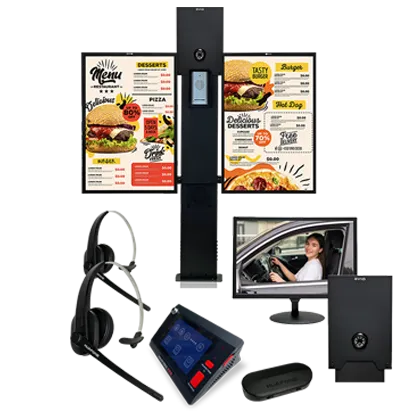
Strip away the marketing language and every system is built from the same four pieces:
The base station. This lives inside, usually mounted near the register or handed to whoever’s running the window. It’s the hub — everything else talks to it.
A headset or handheld mic for your crew. This is how your team hears the customer and responds. Some systems use a fixed mic at a single station; others give staff a wireless headset so they can keep moving instead of standing next to a box on the wall.
An outdoor speaker post. Weatherproof, mounted at the menu board, usually paired with a vehicle detector so it dings or lights up when a car pulls in — so nobody’s yelling “welcome to [restaurant]” into an empty lane.
The cabling or wireless link connecting all of it. This is the part that gets skipped in most product descriptions, and it’s the part that determines how much of a headache installation becomes.
Once you can name these four pieces, every listing you look at gets a lot easier to compare — you’re just checking what each one includes and what condition it’s in.
Wired, Wireless, or Both?
This is the first real decision, and it comes down to how your kitchen is laid out and how busy your window gets.
A fixed mic at one station works fine for a small operation where one person can comfortably handle both the window and the headset without much foot traffic in between. It’s the cheapest way in, and for a slow-to-moderate lane, that’s not a compromise — it’s just the right tool.
A wireless headset makes sense the moment your crew needs to move — pulling drinks, calling out an order to the line, stepping away from the register without missing the next car. Look for battery life specifically; a headset that dies four hours into a shift is a headset you’ll be fighting with by dinner rush. Anything rated around 24 hours of use is a reasonable bar.
Some setups run both: a wireless headset as the primary, with a wired fixed mic as a fallback if the headset’s charging or a battery dies mid-shift. That redundancy costs a little more up front and saves you from a dead system during a lunch rush, which is the worst possible time to find out your only headset needs charging.
The Detail Most Listings Bury: Full Duplex vs. Half Duplex
This is the one spec that actually separates a system that feels professional from one that feels like a walkie-talkie, and almost nobody explains it clearly.
Half duplex means only one side can talk at a time — like a two-way radio. Someone has to stop talking before the other person’s voice comes through. It works, but it feels clunky, and it slows down every single order.
Full duplex means both sides can talk and be heard at the same time, the way a phone call works. The customer can ask a question mid-sentence and your crew member can respond without waiting for a gap. It sounds like a small thing until you’re taking your three-hundredth order of the day, and then it’s the difference between a lane that flows and one that stutters.
If a product page doesn’t mention which one you’re getting, that’s worth a phone call before you buy — it’s not a minor spec, it’s the whole feel of the system.
What You’ll Actually Pay (and Why)
Complete drive-thru intercom systems — base station, headset or mic, outdoor speaker, mounting hardware — generally land somewhere between $1,500 and $2,700 for a single-lane setup built for independent restaurants and small chains. Add-ons like LED menu boards or camera monitoring for the lane push that higher, into the $4,000+ range for a fully loaded bundle.
The enterprise systems built for national chains often run well past $3,000 for equivalent single-lane hardware, and a lot of that premium is enterprise sales infrastructure and service contracts, not necessarily better core hardware. That’s not a knock on those companies — it’s just a different customer they’re built for. If you’re an independent owner buying outright and self-installing, you’re not the customer that pricing model was designed around, so it’s worth asking what you’re actually paying extra for before assuming the higher number means better equipment.
Installation: Can You Really Do This Yourself?
For most single-lane setups, yes — assuming the system is designed for it. Look for kits that ship factory-wired and pre-tested rather than a bag of parts and a wiring diagram. The difference between “self-install in an afternoon” and “call an electrician” usually comes down to whether the manufacturer did the wiring work before it shipped or expects you to.
If you’re retrofitting a lane that already has intercom wiring in place from a previous system, mention that when you’re shopping — some systems need an adaptor to work with existing cable runs, which is a lot cheaper than pulling new wire through your building.
Questions Worth Asking Before You Buy
A short list to bring to any conversation with a sales rep or product specialist:
- Is this full duplex or half duplex?
- What’s the headset’s rated battery life, and is there a wired fallback?
- Is the outdoor speaker rated for my climate — freezing winters, humid summers, coastal salt air?
- Does it ship pre-wired, or will I need an electrician?
- What happens if a piece breaks — is there a support line, and is it staffed by people who can actually troubleshoot, not just process a return?
- What’s the return window if it doesn’t fit my lane the way I expected?
If a company can’t answer these quickly, that tells you something about the support you’ll get after the sale, too.
Where to Go From Here
Every lane is a little different, which is exactly why we built a Kit Finder quiz — answer five quick questions about your lane count, order volume, and existing wiring, and it’ll point you to the specific setup that fits, rather than making you guess between six product pages. If you’d rather just talk it through, our product specialists are on the phone at 800-886-5607, no script, no pressure.
Either way, now you know what you’re actually comparing — which is more than most people get from a product listing.